KwickVIEW Mobile App Design
A mobile app designed for restaurants to manage their business with real-time reporting, online orders, CRM, and more. I led the design of an iOS app that enables owners to monitor and manage operations from anywhere, seamlessly integrating with KwickPOS’s cloud-based system to bring reporting, orders, and enterprise tools into one platform.
Role
UX/UI Design
Industry
Restaurants & Retail
Year
2021

Project Overview
Goals & Approach
Goal
Create a mobile solution that keeps business owners connected to their restaurants anytime, anywhere. The app needed to be intuitive, fast to navigate, and powerful enough to surface key data without overwhelming users.
Approach
Worked with devs to identify core mobile features—real-time reporting, order tracking, and enterprise management. Through wireframes and prototypes, I translated complex desktop workflows into a simplified mobile experience.
Pain Points
Business owners needed immediate visibility into sales and operations but found desktop tools too cumbersome on the go. The challenge was balancing speed and clarity while preserving the depth of data.
Solution
The final design surfaces insights at a glance, with drill-downs for deeper detail. Owners can monitor orders, track performance across locations, and make informed decisions in real time—all within a clean, mobile-friendly interface.


The Prototype in Action
Focus 1
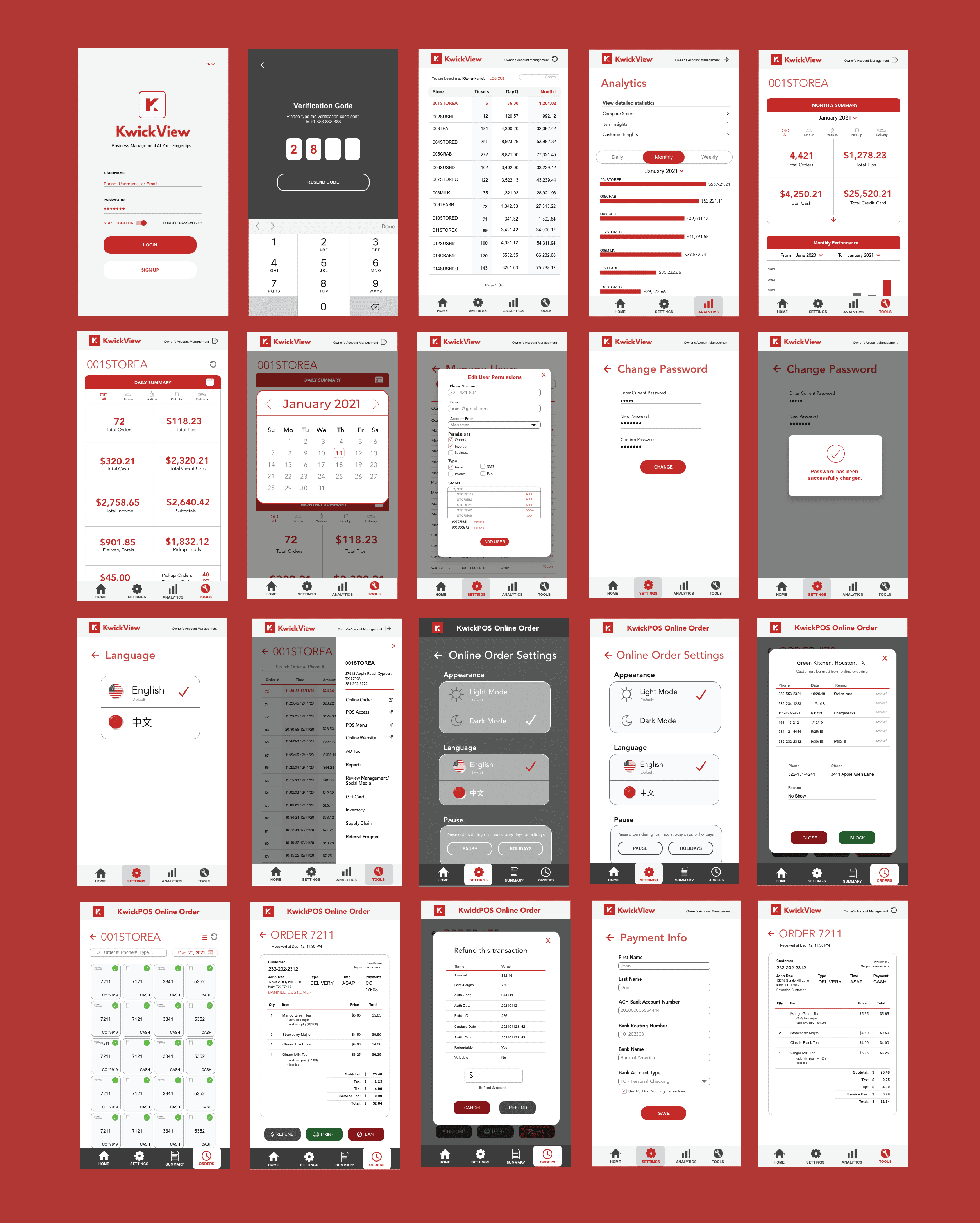
I focused on the features business owners rely on most-reviewing online orders, issuing refunds, switching languages, and tracking performance.
Focus 2
Each flow was designed to cut down the number of steps needed and make sure critical actions were easy to access. The prototype allowed me to test these scenarios and ensure the app fit naturally into a busy owner's day-to-day.
Design Considerations
Prioritizing High-Value Flows
Usability feedback revealed refunds and order tracking as critical actions, leading me to streamline these flows for speed and clarity.
Building across POS, mobile, and web required balancing consistency with context—ensuring each experience felt cohesive while tailored to its environment.
Balancing Aesthetics with Operational Impact
Design decisions focused not just on visual polish, but on improving operational efficiency and real business outcomes.

On-the-Go Use
Design for quick, efficient interactions in real-world contexts.
KwickVIEW Mobile App Design
A mobile app designed for restaurants to manage their business with real-time reporting, online orders, CRM, and more. I led the design of an iOS app that enables owners to monitor and manage operations from anywhere, seamlessly integrating with KwickPOS’s cloud-based system to bring reporting, orders, and enterprise tools into one platform.
Role
UX/UI Designer
Industry
Restaurants & Retail
Year
2021
Project Overview
Goals & Approach
Goal
Create a mobile solution that keeps business owners connected to their restaurants anytime, anywhere. The app needed to be intuitive, fast to navigate, and powerful enough to surface key data without overwhelming users.
Approach
Worked with devs to identify core mobile features—real-time reporting, order tracking, and enterprise management. Through wireframes and prototypes, I translated complex desktop workflows into a simplified mobile experience.
Pain Points
Business owners needed immediate visibility into sales and operations but found desktop tools too cumbersome on the go. The challenge was balancing speed and clarity while preserving the depth of data.
Solution
The final design surfaces insights at a glance, with drill-downs for deeper detail. Owners can monitor orders, track performance across locations, and make informed decisions in real time—all within a clean, mobile-friendly interface.
Connect to Content
Add layers or components to infinitely loop on your page.
The Prototype in Action
Focus 1
I focused on the features business owners rely on most-reviewing online orders, issuing refunds, switching languages, and tracking performance.
Focus 2
Each flow was designed to cut down the number of steps needed and make sure critical actions were easy to access. The prototype allowed me to test these scenarios and ensure the app fit naturally into a busy owner's day-to-day.
Design Considerations
Prioritizing High-Value Flows
Usability feedback revealed refunds and order tracking as critical actions, leading me to streamline these flows for speed and clarity.
Building across POS, mobile, and web required balancing consistency with context—ensuring each experience felt cohesive while tailored to its environment.
Balancing Aesthetics with Operational Impact
Design decisions focused not just on visual polish, but on improving operational efficiency and real business outcomes.
KwickVIEW Mobile App Design
A mobile app designed for restaurants to manage their business with real-time reporting, online orders, CRM, and more. I led the design of an iOS app that enables owners to monitor and manage operations from anywhere, seamlessly integrating with KwickPOS’s cloud-based system to bring reporting, orders, and enterprise tools into one platform.
Project Overview
Goals & Approach
Goal
Create a mobile solution that keeps business owners connected to their restaurants anytime, anywhere. The app needed to be intuitive, fast to navigate, and powerful enough to surface key data without overwhelming users.
Approach
Worked with devs to identify core mobile features—real-time reporting, order tracking, and enterprise management. Through wireframes and prototypes, I translated complex desktop workflows into a simplified mobile experience.
Pain Points
Business owners needed immediate visibility into sales and operations but found desktop tools too cumbersome on the go. The challenge was balancing speed and clarity while preserving the depth of data.
Solution
The final design surfaces insights at a glance, with drill-downs for deeper detail. Owners can monitor orders, track performance across locations, and make informed decisions in real time—all within a clean, mobile-friendly interface.
Connect to Content
Add layers or components to infinitely loop on your page.
The Prototype in Action
Focus 1
I focused on the features business owners rely on most-reviewing online orders, issuing refunds, switching languages, and tracking performance.
Focus 2
Each flow was designed to cut down the number of steps needed and make sure critical actions were easy to access. The prototype allowed me to test these scenarios and ensure the app fit naturally into a busy owner's day-to-day.
Design Considerations
Prioritizing High-Value Flows
Usability feedback revealed refunds and order tracking as critical actions, leading me to streamline these flows for speed and clarity.
Building across POS, mobile, and web required balancing consistency with context—ensuring each experience felt cohesive while tailored to its environment.
Balancing Aesthetics with Operational Impact
Design decisions focused not just on visual polish, but on improving operational efficiency and real business outcomes.
Design for quick, efficient interactions in real-world contexts.
On-the-Go Use
Connect to Content
Add layers or components to infinitely loop on your page.
Role
UX/UI Designer
Industry
Restaurants & Retail
Year
2021